点击上面蓝色字体关注“IT大飞说” 置顶公众号(**ID:ITBigFly**)第一时间收到推送
作为 Android 开发者,无奈经常会碰到各种各样的奇葩需求,现在大多公司 UI 设计图、标注都是按 IOS 来设计的,包括一个IOS特有的效果等,要实现和 IOS 一样的效果,无奈 Android 只能各种仿 IOS 了,经常也是产品被怼,IOS 能实现,为什么 Android 不能实现?好吧,今天我们就来写一个仿 IOS 的加载 loading 效果。
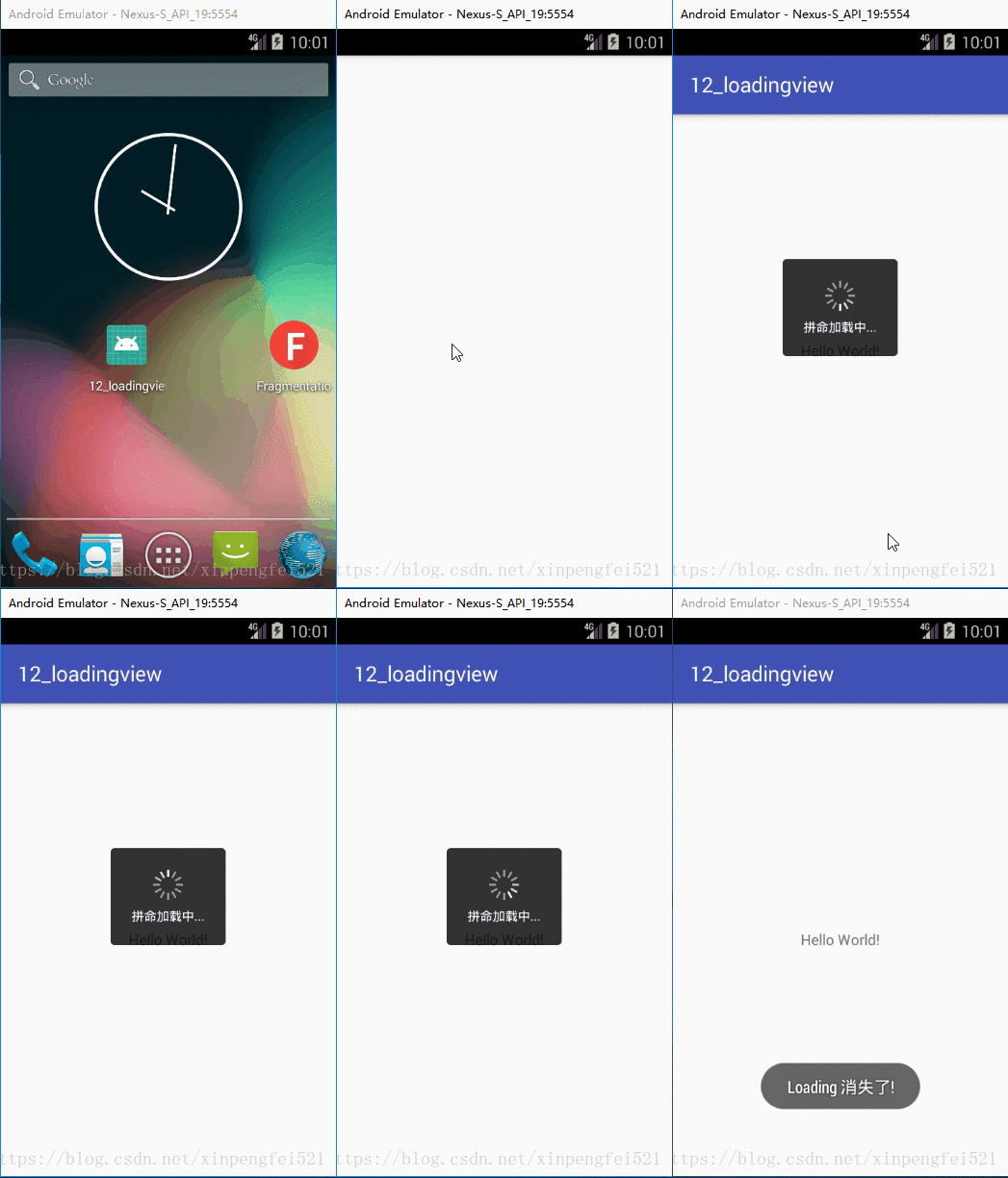
1.先看效果图
效果还满意吧?实现的思路是,在页面上弹出一个全屏的 popupWindow,居中是一个半透明的圆角shape,中间一个 gif 图片,下面是一个 TextView,最外层布局背景为透明,另外把其他需外设置的属性及参数通过建造者模式从外部进行配置,同时提供默认的属性值,这样可以适应各种需求的变化了,代码也比较简单,我的注释也写的比较详细,相信你一定能看得懂。
2.代码实现 1 2 3 4 5 6 7 8 9 10 11 12 13 14 15 16 17 18 19 20 21 22 23 24 25 26 27 28 29 30 31 32 33 34 35 36 37 38 39 40 41 42 43 44 45 46 47 48 49 50 51 52 53 54 55 56 57 58 59 60 61 62 63 64 65 66 67 68 69 70 71 72 73 74 75 76 77 78 79 80 81 82 83 84 85 86 87 88 89 90 91 92 93 94 95 96 97 98 99 100 101 102 103 104 105 106 107 108 109 110 111 112 113 114 115 116 117 118 119 120 121 122 123 124 125 126 127 128 129 130 131 132 133 134 135 136 137 138 139 140 141 142 143 144 145 146 147 148 149 150 151 152 153 154 155 156 157 158 159 160 161 162 163 164 165 166 167 168 169 170 171 172 173 174 175 176 177 178 179 180 181 182 183 184 185 186 187 188 189 190 191 192 193 194 195 196 197 198 199 200 201 202 203 204 205 206 207 208 209 210 211 212 213 214 215 216 217 218 219 220 221 222 223 224 225 226 227 228 229 230 231 232 233 234 235 236 237 238 239 240 241 242 243 244 245 246 247 248 249 250 251 252 253 254 255 256 257 258 259 260 261 262 263 264 265 266 267 268 269 270 271 272 273 274 275 276 277 278 279 280 281 282 283 284 285 286 287 288 289 290 291 292 293 294 295 296 297 298 299 300 301 302 303 304 305 306 307 308 309 310 311 312 313 314 315 316 317 318 319 320 321 322 323 324 325 326 327 328 329 330 331 332 333 334 335 336 337 338 339 340 341 342 343 344 345 346 347 348 349 350 351 352 353 354 355 356 357 358 359 360 361 362 363 364 365 366 367 368 369 370 371 372 373 374 375 376 377 378 379 380 381 382 383 384 385 386 387 388 389 390 391 392 393 394 395 396 397 398 399 400 401 402 403 404 /** * Created by Feifei on 2018/8/22 :) * Function: */ public class LoadingView { private String mText; private int mTextSize; private int mGifWidth; private int mGifHeight; private int mDrawableId; private View mPopupView; private Context mContext; private String mTextColor; private int mCornerRadius; private int mLoadingWidth; private int mLoadingHeight; private int mTextMarginTop; private boolean mIsFocusable; private String mLoadingBgColor; private PopupWindow mPopupWindow; private WeakReference<View> mView; private OnLoadingListener mListener; private static final String DEFAULT_TEXT = "加载中..."; // default text private static final int DEFAULT_TEXT_SIZE = 12; // default text size private static final int DEFAULT_TEXT_MARGIN_TOP = 6; // default text margin top private static final String DEFAULT_TEXT_COLOR = "#FFFFFF"; // default text color private static final int DEFAULT_CORNER_RADIUS = 4; // default loading background radius size private static final String DEFAULT_LOADING_BG_COLOR = "#CC000000"; // default loading background color private static final int DEFAULT_DRAWABLE_ID = R.drawable.loading1; // default loading drawable private static final int DEFAULT_GIF_WIDTH = 30; // default gif width private static final int DEFAULT_GIF_HEIGHT = 30; // default gif height /** * Constructor. * * @param builder */ public LoadingView(Builder builder) { this.mText = builder.text; this.mView = builder.view; this.mListener = builder.listener; this.mTextSize = builder.textSize; this.mTextColor = builder.textColor; this.mCornerRadius = builder.cornerRadius; this.mContext = builder.applicationContext; this.mLoadingBgColor = builder.loadingBgColor; this.mDrawableId = builder.drawableId; this.mGifWidth = builder.gifWidth; this.mGifHeight = builder.gifHeight; this.mLoadingWidth = builder.loadingWidth; this.mLoadingHeight = builder.loadingHeight; this.mTextMarginTop = builder.textMarginTop; this.mIsFocusable = builder.isFocusable; initView(); } /** * Initialize view parameters. */ private void initView() { if (mPopupView == null) { mPopupView = View.inflate(mContext, R.layout.popupwindow_loading, null); } if (mPopupWindow == null) { mPopupWindow = new PopupWindow(mPopupView, WindowManager.LayoutParams.MATCH_PARENT, WindowManager.LayoutParams.MATCH_PARENT); } mPopupWindow.setOnDismissListener(() -> { if (mListener != null) { mListener.onDismiss(); } }); mPopupWindow.setBackgroundDrawable(new BitmapDrawable()); // 当 mIsFocusable 为 true 时,响应返回键消失,为 false 时响应 activity 返回操作,默认为 false mPopupWindow.setFocusable(mIsFocusable); LinearLayout llLoadingBg = (LinearLayout) mPopupView.findViewById(R.id.llLoadingBg); ImageView ivLoading = (ImageView) mPopupView.findViewById(R.id.ivLoading); TextView tvContent = (TextView) mPopupView.findViewById(R.id.tvContent); RelativeLayout.LayoutParams rlParams = (RelativeLayout.LayoutParams) llLoadingBg.getLayoutParams(); if (mLoadingWidth != -1 && mLoadingHeight != -1) { rlParams.width = dp2px(mLoadingWidth); rlParams.height = dp2px(mLoadingHeight); } else { rlParams.width = RelativeLayout.LayoutParams.WRAP_CONTENT; rlParams.height = RelativeLayout.LayoutParams.WRAP_CONTENT; } llLoadingBg.setLayoutParams(rlParams); GradientDrawable mGroupDrawable = new GradientDrawable(); /*设置 Drawable 的形状为矩形*/ mGroupDrawable.setShape(GradientDrawable.RECTANGLE); /*设置背景颜色*/ mGroupDrawable.setColor(Color.parseColor(mLoadingBgColor)); /*设置圆角大小*/ mGroupDrawable.setCornerRadius(dp2px(mCornerRadius)); llLoadingBg.setBackground(mGroupDrawable); LinearLayout.LayoutParams params = (LinearLayout.LayoutParams) tvContent.getLayoutParams(); params.topMargin = dp2px(mTextMarginTop); tvContent.setLayoutParams(params); /*设置显示文本*/ tvContent.setText(mText); /*设置文本大小(以 SP 为单位)*/ tvContent.setTextSize(TypedValue.COMPLEX_UNIT_SP, mTextSize); /*设置文本颜色*/ tvContent.setTextColor(Color.parseColor(mTextColor)); LinearLayout.LayoutParams llParams = (LinearLayout.LayoutParams) ivLoading.getLayoutParams(); llParams.width = dp2px(mGifWidth); llParams.height = dp2px(mGifHeight); ivLoading.setLayoutParams(llParams); /*加载 GIF 图片*/ Glide.with(mContext).load(mDrawableId) .diskCacheStrategy(DiskCacheStrategy.SOURCE) .into(ivLoading); } /** * Show popupWindow. */ public void show() { dismiss(); if (mPopupWindow != null) { // 必须要 post runnable,如果在onCreate中调用则会抛:android.view.WindowManager$BadTokenException: Unable to add window -- token mView.get().post(() -> mPopupWindow.showAtLocation(mView.get(), Gravity.BOTTOM | Gravity.CENTER_HORIZONTAL, 0, 0)); } } /** * Cancel popupWindow showing. */ public void dismiss() { if (mPopupWindow != null && mPopupWindow.isShowing()) { mPopupWindow.dismiss(); } } /** * Invoke on Activity onDestroy() method. */ public void dispose() { if (mPopupWindow != null && mPopupWindow.isShowing()) { mPopupWindow.dismiss(); } mPopupWindow = null; if (mView != null) { mView.clear(); mView = null; } } /** * PopupWindow is or not showing. * * @return */ public boolean isShowing() { return mPopupWindow != null && mPopupWindow.isShowing(); } /** * Builder inner class. */ public static final class Builder { private String text; private String textColor; private int textSize = -1; private int gifWidth = -1; private int gifHeight = -1; private int drawableId = -1; private String loadingBgColor; private int cornerRadius = -1; private int loadingWidth = -1; private int loadingHeight = -1; private int textMarginTop = -1; private boolean isFocusable = false; private WeakReference<View> view; private OnLoadingListener listener; private Context applicationContext; /** * Constructor */ public Builder(Context context) { this.applicationContext = context.getApplicationContext(); } /** * Set content text. * * @param text * @return */ public Builder setText(String text) { this.text = text; return this; } /** * Set text size. * * @param textSize * @return */ public Builder setTextSize(int textSize) { this.textSize = textSize; return this; } /** * Set text margin top dimen. * * @param textMarginTop * @return */ public Builder setTextMarginTop(int textMarginTop) { this.textMarginTop = textMarginTop; return this; } /** * Set popupWindow's focusable. * * @param isFocusable * @return */ public Builder setFocusable(boolean isFocusable) { this.isFocusable = isFocusable; return this; } /** * Set gif imageView width. * * @param gifWidth * @return */ public Builder setGifWidth(int gifWidth) { this.gifWidth = gifWidth; return this; } /** * Set gif imageView height. * * @param gifHeight * @return */ public Builder setGifHeight(int gifHeight) { this.gifHeight = gifHeight; return this; } /** * Set gif loadingView width. * * @param loadingWidth * @return */ public Builder setLoadingWidth(int loadingWidth) { this.loadingWidth = loadingWidth; return this; } /** * Set gif loadingView height. * * @param loadingHeight * @return */ public Builder setLoadingHeight(int loadingHeight) { this.loadingHeight = loadingHeight; return this; } /** * Set text color. * * @param textColor * @return */ public Builder setTextColor(String textColor) { this.textColor = textColor; return this; } /** * Set loadingView corner radius. * * @param cornerRadius * @return */ public Builder setCornerRadius(int cornerRadius) { this.cornerRadius = cornerRadius; return this; } /** * Set loadingView background color. * * @param loadingBgColor * @return */ public Builder setLoadingBgColor(String loadingBgColor) { this.loadingBgColor = loadingBgColor; return this; } /** * Set gif drawable resource. * * @param drawableId * @return */ public Builder setGifDrawable(int drawableId) { this.drawableId = drawableId; return this; } /** * Set location at parent view, because popupWindow must be dependency activity. * * @param view * @return */ public Builder setDropView(View view) { if (view != null) { this.view = new WeakReference<>(view); } else { throw new IllegalArgumentException("must be point parent view!"); } return this; } /** * set on popupWindow dismiss listener. * * @param listener * @return */ public Builder setListener(OnLoadingListener listener) { this.listener = listener; return this; } public LoadingView build() { if (TextUtils.isEmpty(text)) { text = DEFAULT_TEXT; } if (textSize == -1) { textSize = DEFAULT_TEXT_SIZE; } if (textMarginTop == -1) { textMarginTop = DEFAULT_TEXT_MARGIN_TOP; } if (TextUtils.isEmpty(textColor)) { textColor = DEFAULT_TEXT_COLOR; } if (TextUtils.isEmpty(loadingBgColor)) { loadingBgColor = DEFAULT_LOADING_BG_COLOR; } if (cornerRadius == -1) { cornerRadius = DEFAULT_CORNER_RADIUS; } if (view == null) { throw new IllegalArgumentException("must be point parent view!"); } if (drawableId == -1) { drawableId = DEFAULT_DRAWABLE_ID; } if (gifWidth == -1) { gifWidth = DEFAULT_GIF_WIDTH; } if (gifHeight == -1) { gifHeight = DEFAULT_GIF_HEIGHT; } return new LoadingView(this); } } /** * dp convert to px. * * @param dpValue * @return */ private int dp2px(float dpValue) { float scale = mContext.getResources().getDisplayMetrics().density; return (int) (dpValue * scale + 0.5f); } /** * Define popupWindow dismiss listener. */ interface OnLoadingListener { void onDismiss(); } }
3.用法 3.1初始化Loading 1.最基本的用法:
1
2
3
4
5
// 因为 PopupWindow 依赖于Activity,所以必须要调用 setDropView 方法设置要挂载的 View, // 一般是 Activity 或 Fragment 的根 View,其他参数可根据需求进行设置。 mLoadingView = new LoadingView.Builder(this) .setDropView(activity_main) .build();
2.自定义设置各种参数:
1
2
3
4
5
6
7
8
9
10
11
12
13
14
15
16
mLoadingView = new LoadingView.Builder(this) .setText("拼命加载中...") // 设置文案 .setTextSize(12) // 设置字体大小(sp) .setTextColor("#FFFFFF") // 设置字体颜色(#RGB & #ARGB) .setTextMarginTop(10) // 设置文字距上的距离(dp) .setCornerRadius(4) // 设置圆角半径(dp) .setLoadingBgColor("#CC000000") // 设置背景颜色(#RGB & #ARGB) .setLoadingWidth(120) // 设置 loading 的宽(dp) .setLoadingHeight(100) // 设置 loading 的高(dp) .setListener(listener) // 设置监听 .setDropView(activity_main) // 设置要挂载的 View(必须要设置),一般是 Activity 或 Fragment 的根 View .setGifDrawable(R.drawable.loading4) // 设置 gif 资源 .setFocusable(false) // 为 true 时,响应返回键消失,为 false 时响应 activity 返回操作,默认为 false .setGifWidth(16) // 设置 gif 的宽(dp) .setGifHeight(16) // 设置 gif 的高(dp) .build();
3.2 显示Loading 3.3 取消Loading 4.支持的自定义设置
支持设置字体文案、及颜色和字体的大小;
支持设置文字距上的边距;
支持设置Loading的宽高;
支持设置Loading的圆角半径及背景颜色;
支持设置Loading的监听;
支持设置加载其他gif资源;
支持设置gif图片显示的宽高;
支持设置Loading的焦点;
…
好了,今天的分享就到这里,需要下载 Demo 的请点击 「阅读原文」!
猜你喜欢: 深入浅出Retrofit2.x(一) 深入浅出Retrofit2.x(二) 不得不会的10点Java基础知识 Android 最全 Intent 传递数据姿势