初学者的iOS开发学习笔记
作为一个 iOS 开发的初学者,记录一下自己自学 iOS 过程中的一些坑和问题,仅供参考。
1、Main Bundle Id + Extension Bundle Id(小组件)
规则:前半部分相同,后半部分 + .extension
1 | Main app bundle id: com.myapp.testapp |
2、iOS 加异常断点
https://blog.csdn.net/wu_shu_jun/article/details/9045911
https://www.jianshu.com/p/3a0803406d04
https://www.jianshu.com/p/7c0352231eca
3、Incompatible block pointer types sending ‘void
找到对应的报错库,添加:-Xclang -fcompatibility-qualified-id-block-type-checking
链接:https://www.jianshu.com/p/317bdbe86454
这种是临时解决方案,最好的方式是升级对应的第三方库;
4、uncaught exception ‘NSInvalidArgumentException’, reason: ‘+[_LSDefaults sharedInstance]: unrecognized selector sent to class
https://blog.csdn.net/survivorsfyh/article/details/104942440
5、从 pod 删除第三方库:
先在 podfile 文件中删除 pod ‘JSONKit’,然后在执行更新命令
1 | pod update --no-repo-update |
6、**’sharedApplication’ is unavailable: not available on iOS (App Extension) - Use view controller based**
小组件中不能使用 sharedApplication 获取 UIApplication 对象;
7、设置APPLICATION_EXTENSION_API_ONLY
1 | post_install do |installer_representation| |
8、页面(ViewController)跳转
8.1 Push
1 | BadgeController *vc = [[BadgeController alloc] init]; |
8.2 Pop(关闭页面)
1 | [self dismissViewControllerAnimated:YES completion:^{ |
9、ViewController中用代码实现显示 UIImageView UILabel UIButton UI 控件
页面步骤如下:
跟在Android中差不多:
1、创建view对象;
2、设置view的各种属性,如大小摆放位置等;
3、添加到父视图中;
10、Programming with Objective-C (Apple Development)
11、iOS 设置点击事件:
// 方式一
1 | [self.infoView addTapActionWithBlock:^(UIGestureRecognizer *gestureRecoginzer) { |
// 方式二:
1 | UIImageView *iKnowIcon = [CYResource loadImageView:@"free-question-once-more-i-know.png"]; |
方式三:
1 | // 步骤1:创建手势响应函数 |
12、iOS 事件传递
iOS 中只有继承了 UIResponse 的对象才能够接受处理事件。UIResponse是响应对象的基类,定义了处理上述各种事件的接口。常见的子类有:UIView,UIViewController,UIApplication和UIApplicationDelegate.
链接:https://juejin.cn/post/6873761108662943757
记账 app 中设置的点击事件
因为 MineController 是 UIResponse 的子类,而 UIResponse 扩展了QFEventHandle,实现了routerEventWithName 方法,所以,在 MineController 中实现了 routerEventWithName 方法,子 View 在调用这个方法时,传递了点击事件类型,MineController 中会收到回调,而它里面绑定了各种点击事件类型的处理,所有可以处理点击事件。
13、屏幕底部显示如下样式的popup window
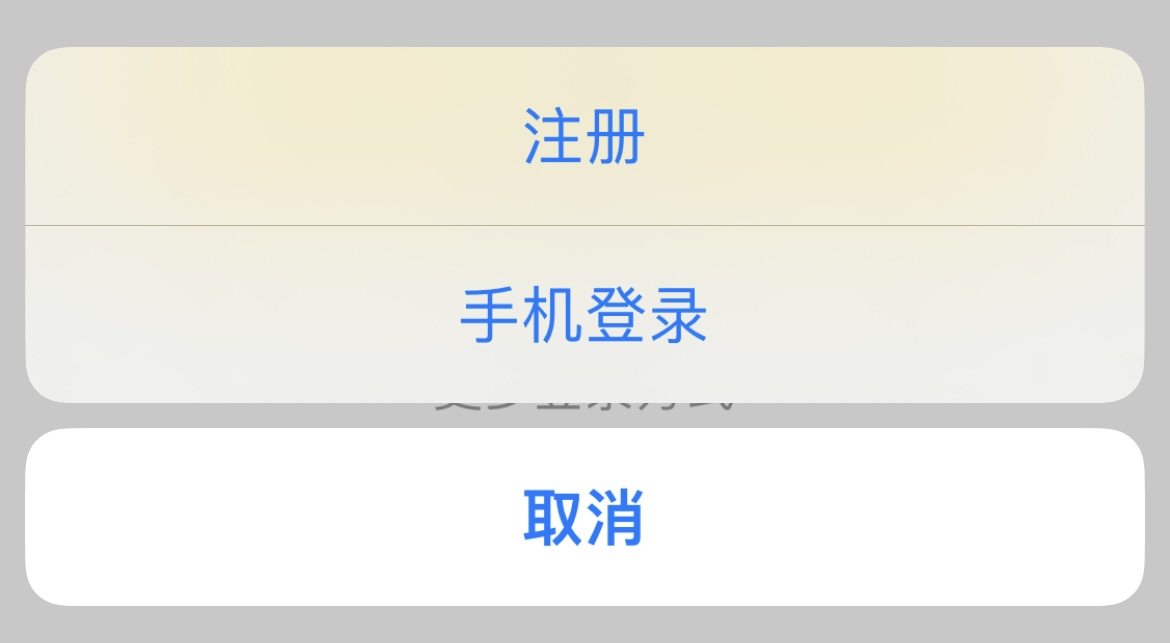
// 更多登录方式
1 | - (IBAction)moreBtnClick:(UIButton *)sender { |
14、NSNotificationCenter 使用(类似于EventBus)
// 前一个页面监听通知
1 | - (void)rac_notification_register { |
// 登录完成
1 | [[[[NSNotificationCenter defaultCenter] rac_addObserverForName:LOPGIN_LOGIN_COMPLETE object:nil] takeUntil:self.rac_willDeallocSignal] subscribeNext:^(id x) { |
// 后一个页面发送通知
1 | [[NSNotificationCenter defaultCenter] postNotificationName:LOPGIN_LOGIN_COMPLETE object:nil]; |
15、将View 跟 xib 文件绑定到一起
1 | [_collection registerNib:[UINib nibWithNibName:@"FindBookCell" bundle:nil] forCellWithReuseIdentifier:@"FindBookCell"]; |
16、控件不显示
如果不显示,可能是被其他控件遮挡住了,设置的约束有问题,可通过 Debug View Hierarchy 看 View 的层级;
17、UIButton 才可以设置点击事件,UIImageView 不可以;
如果需要给 UIImageView 设置点击事件,需要设置它可点击。
18、 OC 中 #pragma mark的意义和作用
它们告诉Xcode编译器,要在编辑器窗格顶部的方法和函数弹出菜单中将代码分隔开,一些类(尤其是一些控制器类)可能很长,方法和函数弹出菜单可以便于代码导航。此时加入 #pragma 指令对代码进行逻辑组织很有效果。
19、设置启动图
有两种方式,方式一:LaunchImage,已被废弃,官方推荐使用 LaunchScreen.storyboard 配置启动图,从 2020.4.30 开始提交 App Store 必须使用故事板来设置启动图。
20、判断相等
1 | void f1() { |
21、《Objective-C For Absolute Beginners》源码
https://github.com/Apress/Objct-C-Abs-Begs
https://github.com/Apress/objective-c-for-absolute-begs-3ed